New: Barcode Detection & Reading in the Document Ingestion API
Tensorlake DocumentAI can now automatically detect and decode barcodes from your documents and scans, returning barcode type, value, and bounding boxes as structured output.
Key Highlights
- Detect and decode barcodes in PDFs, scans, and images with a single API call
- Structured output with barcode type, value, and bounding boxes per barcode
- Available today via `barcode_detection` in parsing options (`model03` OCR model)
What's New
Tensorlake’s Document Ingestion API now detects and decodes barcodes as part of the standard parsing flow. Turn it on by setting a single flag in your parsing_options and get back:
- The barcode type (e.g.
PDF417) - The decoded barcode value
- The bounding box of each barcode on the page
No extra service, tooling, or post-processing required — barcodes are just another structured fragment in your DocumentAI output.
Why It Matters
Barcodes are everywhere in operational documents:
- Shipping labels and packing slips
- Lab reports and sample labels
- Insurance documents and claim IDs
- Utility bills, tickets, and receipts
Until now, extracting barcode data usually meant bolting on a separate barcode library, wiring it into your ingestion pipeline, and stitching the results back to the original pages.
With Tensorlake, barcode extraction becomes a built-in capability:
- Less glue code – One API handles OCR, layout, and barcode reading
- Better context – Barcodes arrive alongside text, tables, and images for the same page
- Easier alignment – Bounding boxes let you link barcode values back to nearby text (e.g., “tracking number” labels)
The Problem
Typical document parsing workflows treat barcodes as an afterthought:
- OCR engines often ignore them entirely
- Barcode SDKs usually operate on raw images, not documents with pages, chunks, and layout
- You have to manually keep track of where each barcode came from and which document region it belongs to
This leads to brittle pipelines and metadata drift. you can decode the barcode, but you don’t know which claim, shipment, or form section it was attached to.
How It Works
When you enable barcode_detection in your parsing options and use the model03 OCR model, the pipeline:
- Parses each page into fragments (text, tables, barcodes, etc.)
- Runs a barcode detector/decoder over the page image
- Emits
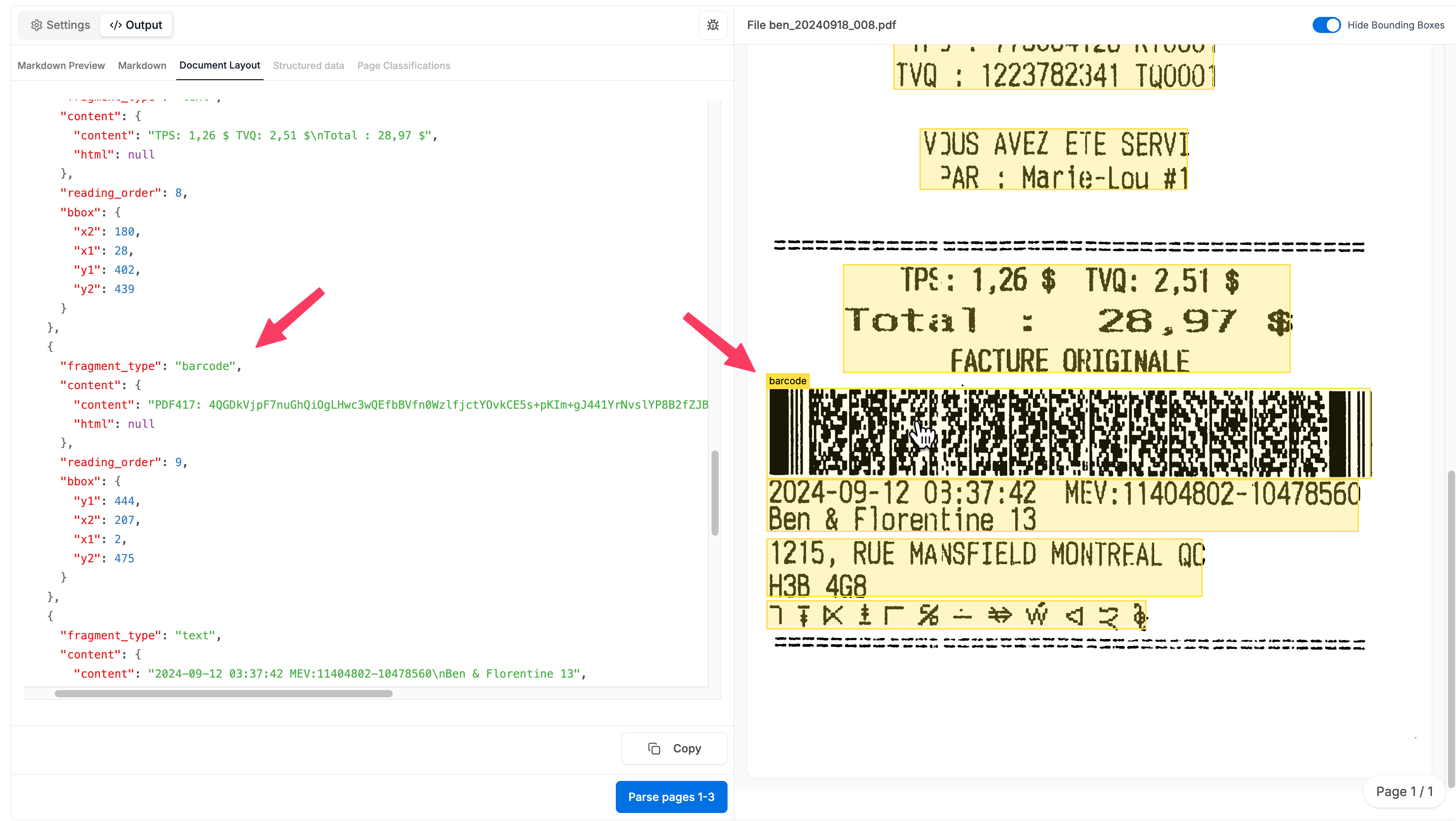
fragment_type: "barcode"entries right alongside normaltextfragments - Includes bounding boxes and page dimensions so you can position or highlight barcodes in a viewer
Barcode fragments show up alongside other page fragments in the response.
Example JSON fragment
1[.code-block-title]Example[.code-block-title]{
2  "fragment_type": "barcode",
3  "content": {
4    "content": "PDF417: 4QGDkVjpF7nuGhQiOgLHwc",
5    "html": null
6  },
7  "reading_order": 9,
8  "bbox": {
9    "y1": 444,
10    "x2": 207,
11    "x1": 2,
12    "y2": 475
13  }
14}
Getting Started
Barcode detection is available starting in the Tensorlake Python SDK version 0.2.91.Make sure you upgrade the SDK before running the examples.1[.code-block-title]Code[.code-block-title]pip install --upgrade tensorlake1. Enable barcode detection in parsing_options
Below is a sample Python snippet using the Tensorlake SDK. The key change is adding barcode_detection="true" to ParsingOptions.
1[.code-block-title]Code[.code-block-title]
2...
3
4doc_ai = DocumentAI(
5  api_key="YOUR_TENSORLAKE_CLOUD_API_KEY"
6)
7
8file_id = doc_ai.upload(path="barcode file 008.pdf")
9
10
11parsing_options = ParsingOptions(
12  ocr_model="model03",
13  barcode_detection="true",
14)
15
16parse_id = doc_ai.read(
17  file_id=file_id,
18  parsing_options=parsing_options,
19)
20
21result = doc_ai.wait_for_completion(parse_id)
22...
23
2. Use barcode output in your workflows
Once you have the decoded barcodes and bounding boxes, you can:
- Match barcodes to internal IDs (shipment, claim, order, patient, etc.)
- Validate that the barcode value matches a printed text ID
- Flag documents where the barcode is missing or unreadable
- Visualize barcodes as overlays in your document viewer
Try it
Sample Cookbook: Barcode Detection Demo
Documentation: Parsing Documents
Status
✅ Live now in the Document Ingestion API and SDKs
✅ Supported in the model03 OCR model



Get server-less runtime for agents and data ingestion

Tensorlake is the Agentic Compute Runtime the durable serverless platform that runs Agents at scale.
“With Tensorlake, we've been able to handle complex document parsing and data formats that many other providers don't support natively, at a throughput that significantly improves our application's UX. Beyond the technology, the team's responsiveness stands out, they quickly iterate on our feedback and continuously expand the model's capabilities.”
.png)
"At SIXT, we're building AI-powered experiences for millions of customers while managing the complexity of enterprise-scale data. TensorLake gives us the foundation we need—reliable document ingestion that runs securely in our VPC to power our generative AI initiatives."
.png)
“Tensorlake enabled us to avoid building and operating an in-house OCR pipeline by providing a robust, scalable OCR and document ingestion layer with excellent accuracy and feature coverage. Ongoing improvements to the platform, combined with strong technical support, make it a dependable foundation for our scientific document workflows.”

"For BindHQ customers, the integration with Tensorlake represents a shift from manual data handling to intelligent automation, helping insurance businesses operate with greater precision, and responsiveness across a variety of transactions"

“Tensorlake let us ship faster and stay reliable from day one. Complex stateful AI workloads that used to require serious infra engineering are now just long-running functions. As we scale, that means we can stay lean—building product, not managing infrastructure.”