New: Header Detection and Correction for accurate document hierarchy
Tensorlake now detects and corrects document headers across pages, maintaining proper hierarchy even when OCR misidentifies header levels.
Key Highlights
- Automatic header hierarchy correction based on numbering patterns and visual structure
- Cross-page header detection without fragmentation
- Section headers include accurate level attributes (0 for #, 1 for ##, etc.)
What's new
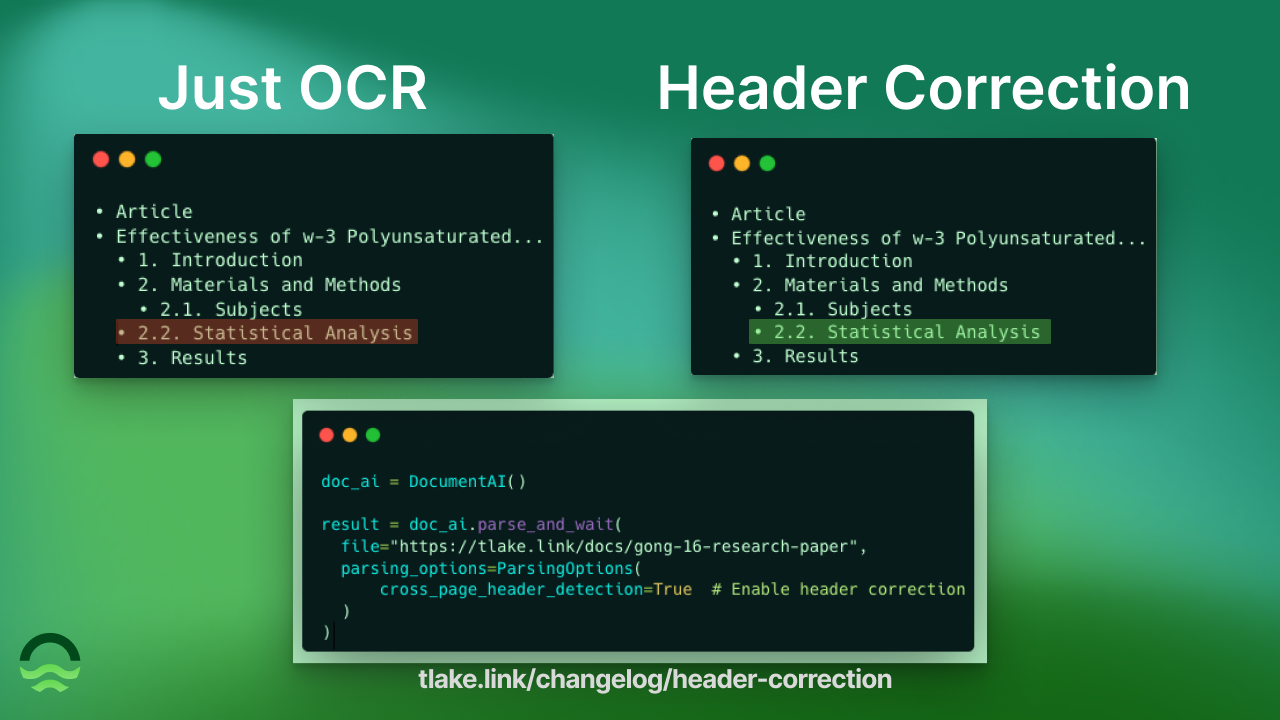
Tensorlake now automatically detects and corrects header hierarchy in parsed documents. Enable cross_page_header_detection=True to get properly structured section headers with accurate level attributes, even when OCR engines misidentify header depths.
Why it matters
- Accurate document structure - preserve logical hierarchy of research papers, technical docs, and reports
- Cross-page headers - detect headers spanning page breaks without fragmentation
- Better RAG quality - improved chunking boundaries and context preservation for retrieval
- Knowledge graphs - build accurate document trees with proper parent-child relationships
The problem
OCR engines frequently misidentify header hierarchy. A subsection labeled "2.2" might get marked as a top-level header (##) instead of a nested header (###):
1[.code-block-title]Code[.code-block-title]# Effectiveness of ω-3 Polyunsaturated Fatty Acids...
2## 1. Introduction
3## 2. Materials and Methods
4### 2.1. Subjects
5## 2.2. Statistical Analysis – Wrong level (should be ###)
6## 3. Results
Section 2.2 should be level 2 (nested under section 2), not level 1 (peer to section 2).
How it works
Tensorlake analyzes header patterns across the entire document to correct hierarchy:
1[.code-block-title]Code[.code-block-title]from tensorlake.documentai import DocumentAI, ParsingOptions
2
3doc_ai = DocumentAI()
4
5result = doc_ai.parse_and_wait(
6  file="https://tlake.link/docs/gong-16-research-paper",
7  parsing_options=ParsingOptions(
8    cross_page_header_detection=True  # Enable header correction
9  )
10)
11
12# Access corrected headers
13for page in result.pages:
14  for page_fragment in page.page_fragments:
15    if page_fragment.fragment_type == "section_header":
16      print(f"Level {page_fragment.content.level}: {page_fragment.content.content}")
Corrected output:
1[.code-block-title]Code[.code-block-title]level=0, content='Article'
2level=0, content='Effectiveness of ω-3 Polyunsaturated Fatty Acids...'
3level=1, content='1. Introduction'
4level=1, content='2. Materials and Methods'
5level=2, content='2.1. Subjects'
6level=2, content='2.2. Statistical Analysis'  # Corrected to level 2
7level=1, content='3. Results'
What you get
Section headers now include:- level: Integer representing header depth (0 = #, 1 = ##, 2 = ###, etc.)- content: Clean header text without markdown formatting
Build document outlines programmatically:
1[.code-block-title]Code[.code-block-title]for page in result.pages:
2  for page_fragment in page.page_fragments:
3    if page_fragment.fragment_type == "section_header":
4      indent = "  " * page_fragment.content.level
5      print(f"{indent}• {page_fragment.content.content}")
6
7# Output:
8# • Article
9# • Effectiveness of ω-3 Polyunsaturated Fatty Acids...
10#   • 1. Introduction
11#   • 2. Materials and Methods
12#     • 2.1. Subjects
13#     • 2.2. Statistical Analysis
14#   • 3. Results
Try it
Colab Notebook: Header Detection Example
Documentation: Parsing Options Reference
Enable cross_page_header_detection=True in your parse requests to get corrected document hierarchy automatically.
Status
✅ Live now in the API, SDK, and on cloud.tensorlake.ai.
Add cross_page_header_detection=True to your ParsingOptions to enable.



Get server-less runtime for agents and data ingestion

Tensorlake is the Agentic Compute Runtime the durable serverless platform that runs Agents at scale.
“With Tensorlake, we've been able to handle complex document parsing and data formats that many other providers don't support natively, at a throughput that significantly improves our application's UX. Beyond the technology, the team's responsiveness stands out, they quickly iterate on our feedback and continuously expand the model's capabilities.”
.png)
"At SIXT, we're building AI-powered experiences for millions of customers while managing the complexity of enterprise-scale data. TensorLake gives us the foundation we need—reliable document ingestion that runs securely in our VPC to power our generative AI initiatives."
.png)
“Tensorlake enabled us to avoid building and operating an in-house OCR pipeline by providing a robust, scalable OCR and document ingestion layer with excellent accuracy and feature coverage. Ongoing improvements to the platform, combined with strong technical support, make it a dependable foundation for our scientific document workflows.”

"For BindHQ customers, the integration with Tensorlake represents a shift from manual data handling to intelligent automation, helping insurance businesses operate with greater precision, and responsiveness across a variety of transactions"

“Tensorlake let us ship faster and stay reliable from day one. Complex stateful AI workloads that used to require serious infra engineering are now just long-running functions. As we scale, that means we can stay lean—building product, not managing infrastructure.”