New: Tracked Changes Parsing for Word Documents
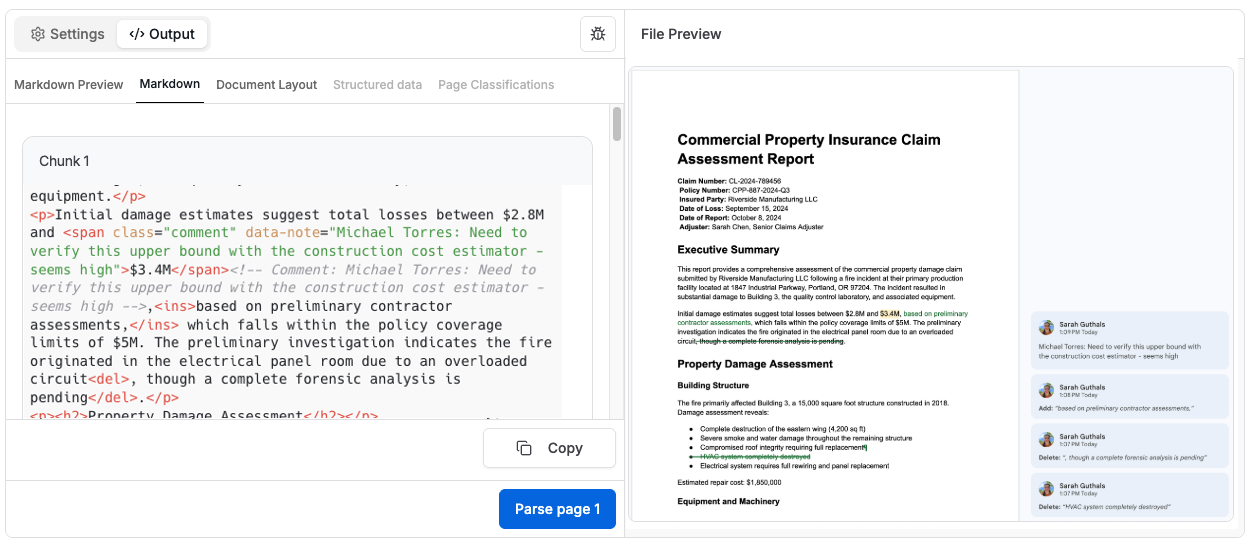
Tensorlake now preserves tracked changes (insertions, deletions, and comments) from Word documents as structured HTML, enabling programmatic access to document revision history.
Key Highlights
- Preserve insertions, deletions, and comments from .docx tracked changes
- Structured HTML output with semantic tags (, , )
- Extract author metadata and comment text programmatically
What's new
Tensorlake now parses Word documents (.docx) with tracked changes intact, returning structured HTML where insertions, deletions, and comments are preserved with full metadata. No more manually reviewing revision history, keep track of changes and comments programmatically.
Why it matters
- Audit trails - Extract complete revision history for compliance and record-keeping
- Workflow automation - Route documents based on specific reviewer comments or edits
- Change analysis - Programmatically identify what was added, removed, or flagged by stakeholders
- Version control - Build diffs and approval workflows without manual document review
The problem
Most document parsers strip tracked changes entirely. When you parse a Word document with python-docx, Pandoc, or cloud OCR APIs, you lose all revision metadata:
- python-docx: No API support for tracked changes—deletions and insertions are ignored
- Pandoc: Can preserve changes with
--track-changes=all, but output is cluttered and requires custom filters - Cloud OCR: Designed for scanned documents, not revision metadata
The underlying issue? Word stores tracked changes in complex OOXML structures (<w:del>, <w:ins>, <w:comment> nodes) that most parsers can't reconstruct.
How it works
Tensorlake extracts tracked changes from .docx files and returns clean, structured HTML:
from tensorlake.documentai import DocumentAI
1[.code-block-title]Code[.code-block-title]from tensorlake.documentai import DocumentAI
2
3doc_ai = DocumentAI()
4
5result = doc_ai.parse_and_wait(
6  file="https://example.com/claim_report_with_tracked_changes.docx"
7)
8
9# Get HTML with tracked changes preserved
10html_content = result.pages[0].page_fragments[0].content.content
11print(html_content)
Output format:
1[.code-block-title]HTML[.code-block-title]<p>Initial damage estimates suggest total losses between $2.8M and
2<span class="comment" data-note="Michael Torres: Need to verify this upper bound">$3.4M</span>,
3<ins>based on preliminary contractor assessments,</ins> which falls within policy limits
4<del>though a complete forensic analysis is pending</del>.</p>
What you get
Tracked changes are preserved as semantic HTML:
- Deletions:
<del>removed text</del> - Insertions:
<ins>added text</ins> - Comments:
<span class="comment" data-note="comment text">highlighted text</span>
Parse with any HTML library to extract revision metadata:
1[.code-block-title]Code[.code-block-title]from bs4 import BeautifulSoup
2
3soup = BeautifulSoup(html_content, 'html.parser')
4
5# Extract all comments
6comments = []
7for span in soup.find_all('span', class_='comment'):
8  comments.append({
9    'text': span.get_text(strip=True),
10    'comment': span.get('data-note', '')
11  })
12
13# Extract all deletions
14deletions = [del_tag.get_text() for del_tag in soup.find_all('del')]
15for deletion in deletions:
16  print(f"Deleted: {deletion}")
17
18# Extract all insertions
19insertions = [ins_tag.get_text() for ins_tag in soup.find_all('ins')]
20for insertion in insertions:
21  print(f"Inserted: {insertion}")
22
23# Print all comments
24for comment in comments:
25  print(f"Comment: {comment['text']} - {comment['comment']}")
Use cases
Insurance claim reviewExtract comments from multiple adjusters and route for legal review based on flagged sections.
Contract redliningIdentify all changes made by counterparties and generate change summaries automatically.
Regulatory complianceMaintain complete audit trails of document edits with author attribution and timestamps.
Collaborative editing workflowsBuild approval systems that trigger based on specific reviewer feedback or edit patterns.
Try it
Colab Notebook: Tracked Changes Demo
Documentation: Parsing Documents
Parse any .docx file with tracked changes and Tensorlake automatically preserves all revision metadata.
Status
✅ Live now in the API, SDK, and on cloud.tensorlake.ai.
Works automatically on all .docx files with tracked changes, no additional configuration needed.



Get server-less runtime for agents and data ingestion

Tensorlake is the Agentic Compute Runtime the durable serverless platform that runs Agents at scale.
“With Tensorlake, we've been able to handle complex document parsing and data formats that many other providers don't support natively, at a throughput that significantly improves our application's UX. Beyond the technology, the team's responsiveness stands out, they quickly iterate on our feedback and continuously expand the model's capabilities.”
.png)
"At SIXT, we're building AI-powered experiences for millions of customers while managing the complexity of enterprise-scale data. TensorLake gives us the foundation we need—reliable document ingestion that runs securely in our VPC to power our generative AI initiatives."
.png)
“Tensorlake enabled us to avoid building and operating an in-house OCR pipeline by providing a robust, scalable OCR and document ingestion layer with excellent accuracy and feature coverage. Ongoing improvements to the platform, combined with strong technical support, make it a dependable foundation for our scientific document workflows.”

"For BindHQ customers, the integration with Tensorlake represents a shift from manual data handling to intelligent automation, helping insurance businesses operate with greater precision, and responsiveness across a variety of transactions"

“Tensorlake let us ship faster and stay reliable from day one. Complex stateful AI workloads that used to require serious infra engineering are now just long-running functions. As we scale, that means we can stay lean—building product, not managing infrastructure.”